

If you’ve just signed up for Wealthsimple, don’t miss your chance to claim your free cash bonus or stock reward by adding a referral code. Many new users skip this step simply because they don’t know where to enter it — but it only takes a few seconds to unlock your reward.
In this step-by-step guide, you’ll learn exactly how to add your Wealthsimple referral code using the app’s built-in Gift Box feature. This tutorial is fully updated for 2026 and works seamlessly on both iOS and Android devices.
Ready to claim your bonus? Enter the Wealthsimple referral code QJQSMR before making your first deposit.
Why Use a Wealthsimple Referral Code?
A Wealthsimple referral code is the easiest way to earn a little extra when you open your account. New users can receive a cash bonus or free stock just for entering a referral code — no extra steps, no hidden conditions. It’s completely free to claim either when you sign up or afterward through the app’s “Invite Friends” section.
The referral program is designed to reward both users — the person who shares the code and the one who enters it. Everyone wins, and it’s one of the simplest ways to start your investing journey with a bonus already in your account.
Use my referral link to get your bonus instantly: Claim your Wealthsimple bonus now.
Where to Add the Referral Code in the Wealthsimple App
You can add your Wealthsimple referral code either during signup or after creating your account. If you’ve already registered, don’t worry — you can still claim your bonus directly inside the app using the built-in Gift Box feature. Here’s exactly how to do it:
Step 1 — Open the Wealthsimple App
Launch the Wealthsimple app on your phone and log in to your account. Make sure you’re using the latest version of the app for the smoothest experience.
Step 2 — Tap the Gift Box Icon
On the top-right corner of your home screen, you’ll see a small gift box icon 🎁. This is where you can view and manage all referral rewards. Tap it to continue.
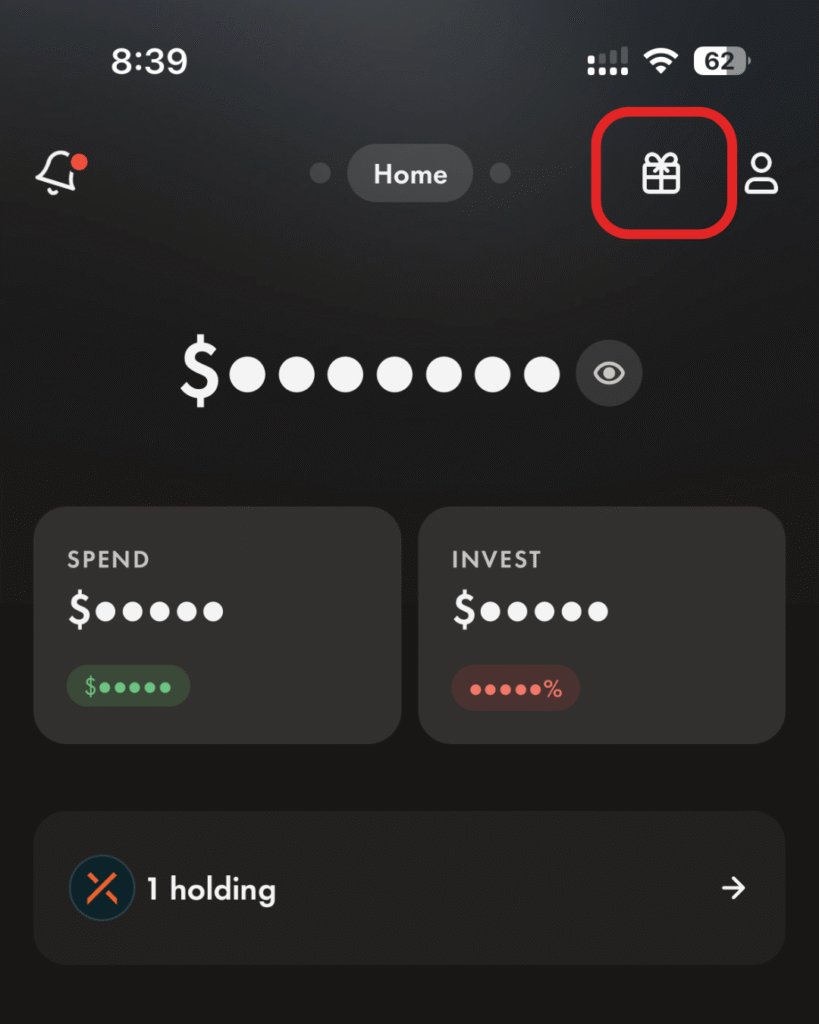
Step 3 — Select “Invite Friends” or “Add a Referral Code”
Depending on your app version, tap “Invite Friends” or “Have a Code?”. Both options will bring you to the screen where you can enter your referral code.
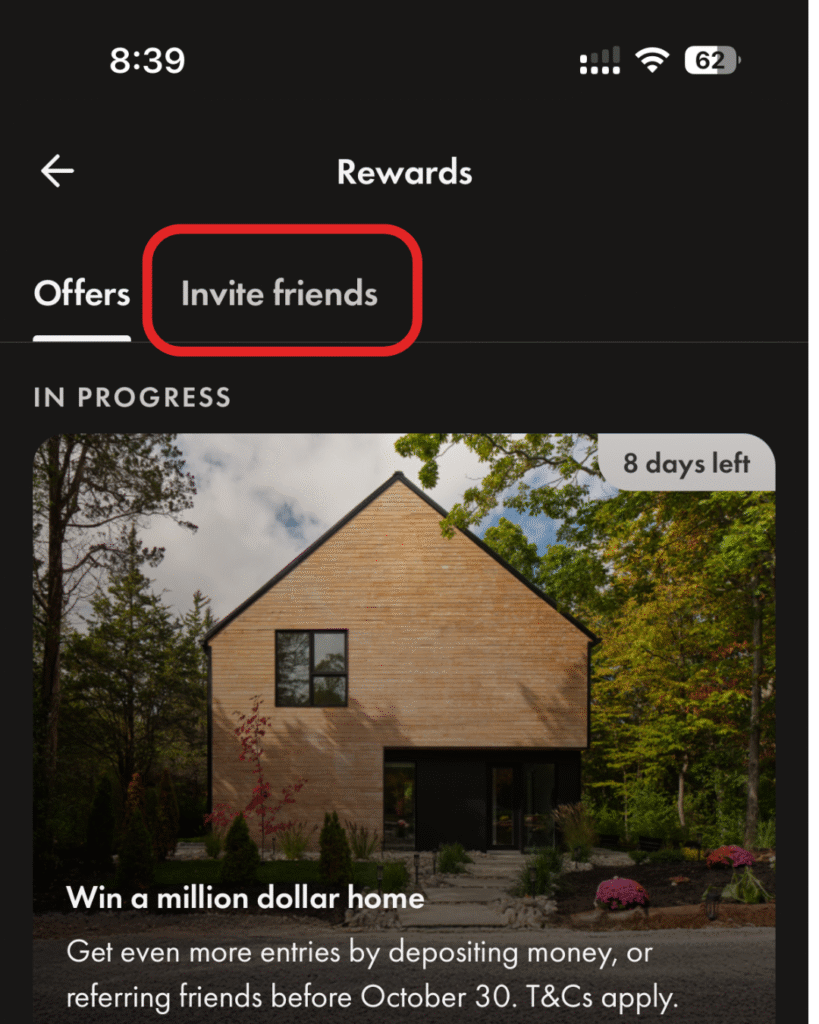
Step 4 — Enter the Referral Code
Type in your referral code exactly as it appears and tap confirm. Your code will be saved, and your bonus will be activated once you meet the eligibility criteria — usually completing your first deposit or trade.
Step 5 — Confirm Your Bonus
After you complete your qualifying deposit, your referral reward should appear in your account within a few business days. You’ll also see a confirmation inside the Gift Box section of the app.
Common Issues When Adding a Referral Code
Most new users add their Wealthsimple referral code without any problems, but a few common issues can come up. Here’s how to fix them quickly and make sure you don’t miss your bonus:
Already signed up?
If you’ve already created your Wealthsimple account, you can still add your referral code. Simply open the app, tap the Gift Box icon, and select “Have a Code?” to enter it manually. Make sure to do this before your first trade or deposit so it counts toward your bonus.
Entered the wrong code?
Mistyped codes happen. If you realize you entered the wrong one, reach out to Wealthsimple Support right away. As long as you haven’t completed your first trade or deposit, they can usually correct the issue.
Didn’t receive your bonus?
Referral rewards typically appear within 5–7 business days after completing your qualifying deposit. If it’s been longer, check that you met the requirements (like the minimum deposit amount) and confirm with Wealthsimple Support if needed. For all current Wealthsimple offers, see our Wealthsimple promotions guide.
Sources
Figures checked against these sources on November 12, 2026.
FAQs: Adding Your Wealthsimple Referral Code
Can I add a referral code after signing up?
Yes. You can still enter a referral code even after creating your account. Simply open the Wealthsimple app, tap the Gift Box icon, then select “Invite Friends” → “Have a Code?” to add it anytime before making your first trade or deposit.
How long does it take to get my bonus?
Referral bonuses are usually credited within 5–7 business days after you meet the eligibility requirements, such as completing your first deposit or trade.
Where can I find the referral code section?
The referral code section is located in the Wealthsimple app under the Gift Box 🎁 icon in the top-right corner of the home screen. That’s where you can enter, view, or track your rewards.
What if I forget to add the code?
If you forgot to add your referral code during signup, contact Wealthsimple Support before making your first trade or deposit. In many cases, they can still apply it manually.
Does it work on both iPhone and Android?
Yes, the process is identical on both iOS and Android devices. The Gift Box feature and referral steps are the same regardless of your platform.
